
Before Enrolling a Contact:
- Look at the entire contact record for important notes
- Check contact name and email for accuracy
- Make sure contact information is grammatically correct and up to date
Please note: You must mark tasks completed to move forward in every sequence.
[Inbound] New Lead: Chatbot (Email Only) #
Use Case: A lead completes a chatbot conversation and wants to communicate via email only.
Length: 6 emails | 6 tasks
Duration: 6 weeks
- [Inbound] New Lead: Chatbot Email 1
- Check Engagement Task 1
- [Inbound] New Lead: Chatbot Email 2
- Check Engagement Task 2
- [Inbound] New Lead: Chatbot Email 3
- Check Engagement Task 3
- [Inbound] New Lead: Chatbot Email 4
- Check Engagement Task 4
- [Inbound] New Lead: Chatbot Email 5
- [Inbound] New Lead: Chatbot Email 6 (Manual)
[Inbound] New Lead: Email Outreach (Before Calling) #
Use Case: You do not call as first contact (if a lead comes in late at night, too early in the morning to call, etc.). If you do call, use the Left VM sequence.
Length: 7 emails | 6 calls
Duration: 8 weeks
- [Inbound] New Lead: Email Outreach (Before Calling) 1
- Call 1
- [Inbound] New Lead: Email Outreach (Before Calling) 2
- Call 2
- [Inbound] New Lead: Email Outreach (Before Calling) 3
- Call 3
- [Inbound] New Lead: Email Outreach (Before Calling) 4
- Call 4
- [Inbound] New Lead: Email Outreach (Before Calling) 5
- Call 5
- [Inbound] New Lead: Email Outreach (Before Calling) 6 (Manual)
- Call 6
- [Inbound] New Lead: Email Outreach (Before Calling) 7 (Manual)
[Inbound] New Lead: Left VM #
Use Case: It’s a new inbound lead and you left them a voicemail.
Length: 7 emails | 7 calls
Duration: 8 weeks
- [Inbound] New Lead: Left VM Email 1
- Call 2
- [Inbound] New Lead: Left VM Email 2
- Call 3
- [Inbound] New Lead: Left VM Email 3
- Call 4
- [Inbound] New Lead: Left VM Email 4
- Call 5
- [Inbound] New Lead: Left VM Email 5
- Call 6
- [Inbound] New Lead: Left VM Email 6 (Manual)
- Call 7
- [Inbound] New Lead: Left VM Email 7 (Manual)
[Inbound] New Lead: Website Audit #
Use case: The lead filled out a form for our Free SEO Audit.
Please note: A report will automatically run and be linked in a note on their contact record in HubSpot.
It will look like this:
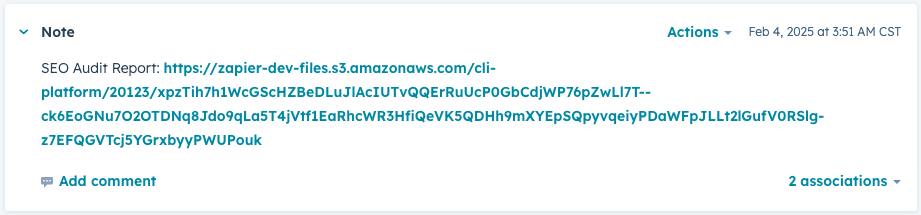
Just click that link and it will download the PDF to your computer.
Rename the PDF before sending to a prospect. Something like, “SEO Audit for example.com” would work well.
Length: 6 emails | 6 calls
Duration: 7 weeks
- [Inbound] New Lead: Website Audit Email 1
- Call 1
- [Inbound] New Lead: Website Audit Email 2
- Call 2
- [Inbound] New Lead: Website Audit Email 3
- Call 3
- [Inbound] New Lead: Website Audit Email 4
- Call 4
- [Inbound] New Lead: Website Audit Email 5
- Call 5
- [Inbound] New Lead: Website Audit Email 6
- Call 6
[Front] New Lead: Left VM #
Use Cases:
- It’s a new front lead and you left a voicemail.
- You have a website analysis to send/go over with them.
Length: 6 emails | 7 calls
Duration: 7 weeks
- [Front] New Lead: Left VM Email 1
- Call 2
- [Front] New Lead: Left VM Email 2
- Call 3
- [Front] New Lead: Left VM Email 3
- Call 4
- [Front] New Lead: Left VM Email 4
- Call 5
- [Front] New Lead: Left VM Email 5
- Call 6
- [Front] New Lead: Left VM Email 6 (Manual)
- Call 7
[Reengagement] Haven’t Spoken In A While #
Use case: Spoke to the prospect before but they’ve stopped responding.
Length: 3 emails | 3 calls
Duration: 4 weeks
- [Reengagement] Haven’t Spoken In A While 1
- Call 1
- [Reengagement] Haven’t Spoken In A While 2
- Call 2
- [Reengagement] Haven’t Spoken In A While 3
- Call 3
NEW [Inbound] New Lead: Invalid Phone Number #
Use Case: A lead does not have a working phone number to call. This is an email only sequence with tasks to check for engagement.
Length: 6 emails | 6 tasks
Duration: 6 weeks
- [Inbound] New Lead: Invalid Phone Number Email 1
- Check Engagement Task 1
- [Inbound] New Lead: Chatbot Email 2
- Check Engagement Task 2
- [Inbound] New Lead: Chatbot Email 3
- Check Engagement Task 3
- [Inbound] New Lead: Chatbot Email 4
- Check Engagement Task 4
- [Inbound] New Lead: Chatbot Email 5
- [Inbound] New Lead: Chatbot Email 6 (Manual)
NEW [Agreement] Long-Term Follow-Up #
Use case: You haven’t heard from the contact after sending an agreement—after a week or so.
Length: 3 emails | 3 calls
Duration: 4 weeks
- [Agreement] Long-Term Follow-Up 1
- Call 1
- [Agreement] Long-Term Follow-Up 2
- Call 2
- [Agreement] Long-Term Follow-Up 3
- Call 3
NEW [Renewal] Time to Renew #
Use case: Your client is up for renewal and you want to reach out to set up a time to go over their account and talk goals for the future.
Length: 3 emails | 3 calls
Duration: 4 weeks
- [Renewal] Time to Renew 1
- Call 1
- [Renewal] Time to Renew 2
- Call 2
- [Renewal] Time to Renew 3
- Call 3


