
Skip to content
Mainstreethost Knowledge Base
  • Sales Portal
  • Main Website

Sales Resources

22
  • HubSpot Guide
  • HubSpot Sales Workspace Overview
  • HubSpot Sequences Cheat Sheet
  • HubSpot Templates Cheat Sheet
  • Inbound Lead Process
  • Renewal Sales Procedures
  • How to Work SEO Audit Leads
  • Refer-a-Friend Program
  • Sales Portal Quick Start Guide
  • Service Name Changes
  • Google Search: Major Updates
  • Google Search Status Dashboard
  • Digital Media Kits
  • Customer Success Stories
  • Customer Testimonials
  • Forbes, Fortune, & Entrepreneur Spotlight
  • Sales Objection Responses
  • SEO: Prospect FAQs
  • Content: Prospect FAQs
  • Web Design: Prospect FAQs
  • PPC: Prospect FAQs
  • Social Media: Prospect FAQs

SEO

6
  • Site Builders and Limitations
  • History of Search Engines & AI
  • Why SEO Matters—And Always Will
  • GEO Service Cheat Sheet
  • SEO vs. GEO
  • SEO: Prospect FAQs

Company Policies

1
  • AI Policy

Web Design

2
  • Mainstreethost Development Blog
  • Web Design: Prospect FAQs

Social Media

7
  • Social Media: What Will We Post?
  • Social Media Tactics Chart
  • Social Media Marketing Showcase
  • Social Media Services Breakdown
  • Custom Social: Advertising Focused Strategy
  • Custom Social: Posting Focused Strategy
  • Social Media: Prospect FAQs

Content

3
  • What Will We Blog About?
  • Common Email Newsletter Topics
  • Content: Prospect FAQs

Hosting

1
  • Ticket Submission Guidelines

PPC

3
  • PPC Service Cheat Sheet
  • Landing Page Cheat Sheet
  • PPC: Prospect FAQs

Misc.

6
  • ChatGPT Prompt Pages
  • Industry Certifications & Courses
  • Industry Resources
  • Virtual Office Backgrounds
  • How to Ask for Reviews
  • Client Photo-Sharing Methods

Brand Assets

1
  • Logos
View Categories
  • Home
  • Sales Resources
  • How to Work SEO Audit Leads

How to Work SEO Audit Leads

2 min read

What makes Free SEO Audit leads different? #

These are more top/ middle-of-the-funnel leads. They are interested in SEO, are aware that it’s important, and are actively looking into potential solutions.

However, their first priority is getting an SEO audit to see where their site currently stands.

The key to working these leads is to provide value and position yourself as not only an expert in the digital marketing field, but as someone who can help them understand the current state of their website.

How do you know when it’s an SEO audit lead? #

As with everything in the inbound pipeline, there are a few things you should do once you receive a lead:

  1. Look at the entire contact record for important notes
  2. Check contact name and email for accuracy
  3. Explore the submitted URL link—it may be a website, landing page, or social media page.

As you complete these steps, you’ll find the form submission on the contact record.

When you see “Laura submitted Free SEO Audit,” that’s when you’ll utilize this approach.

Laura submitted Free SEO Audit

The Process #

Now, when a lead submits an SEO audit form, a report will automatically run and be linked in a note on their contact record in HubSpot. It will look like this:
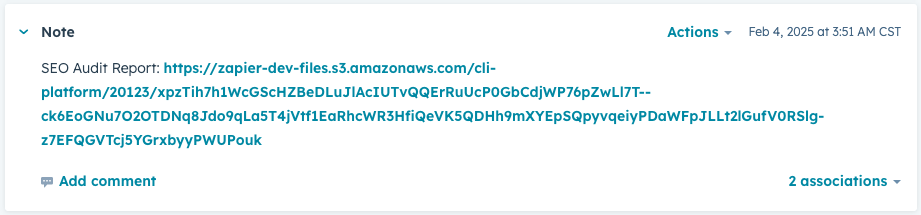
SEO Audit report note in HubSpot with Zapier link

Just click that link and it will download the PDF to your computer.

Rename the PDF before sending to a prospect. Something like, “SEO Audit for example.com” would work well.

Email Sequence #

Personalize your approach if you have the time to review the report before reaching out. Your email or phone call will stand out more if you are able to include some specifics about their audit in the initial outreach.

Here is what the [Inbound] New Lead: SEO Audit sequence contains:

Length: 6 emails | 6 calls

Duration: 7 weeks

  1. [Inbound] New Lead: SEO Audit Email 1
  2. Call 1 Task
  3. [Inbound] New Lead: SEO Audit Email 2
  4. Call 2 Task
  5. [Inbound] New Lead: SEO Audit Email 3
  6. Call 3 Task
  7. [Inbound] New Lead: SEO Audit Email 4
  8. Call 4 Task
  9. [Inbound] New Lead: SEO Audit Email 5
  10. Call 5 Task
  11. [Inbound] New Lead: SEO Audit Email 6
  12. Call 6 Task
Updated on October 22, 2025

What are your Feelings

  • Happy
  • Normal
  • Sad

Share This Article :

  • Facebook
  • X
  • LinkedIn
  • Pinterest

WordPress database error: [You have an error in your SQL syntax; check the manual that corresponds to your MariaDB server version for the right syntax to use near ')) AND p.post_type = 'docs' AND tt.taxonomy = 'doc_category' AND tt.term_id I...' at line 1]
SELECT p.ID FROM msh_wp_posts AS p INNER JOIN msh_wp_term_relationships AS tr ON p.ID = tr.object_id INNER JOIN msh_wp_term_taxonomy AS tt ON tr.term_taxonomy_id = tt.term_taxonomy_id WHERE p.ID = '32' AND p.ID < 371)) AND p.post_type = 'docs' AND tt.taxonomy = 'doc_category' AND tt.term_id IN (6) AND p.ID NOT IN ( SELECT tr.object_id FROM msh_wp_term_relationships tr LEFT JOIN msh_wp_term_taxonomy tt ON (tr.term_taxonomy_id = tt.term_taxonomy_id) WHERE tt.term_id IN (0) ) AND p.post_status = 'publish' ORDER BY p.post_date DESC, p.ID DESC LIMIT 1

WordPress database error: [You have an error in your SQL syntax; check the manual that corresponds to your MariaDB server version for the right syntax to use near ')) AND p.post_type = 'docs' AND tt.taxonomy = 'doc_category' AND tt.term_id I...' at line 1]
SELECT p.ID FROM msh_wp_posts AS p INNER JOIN msh_wp_term_relationships AS tr ON p.ID = tr.object_id INNER JOIN msh_wp_term_taxonomy AS tt ON tr.term_taxonomy_id = tt.term_taxonomy_id WHERE p.ID = '280' AND p.ID > 371)) AND p.post_type = 'docs' AND tt.taxonomy = 'doc_category' AND tt.term_id IN (6) AND p.ID NOT IN ( SELECT tr.object_id FROM msh_wp_term_relationships tr LEFT JOIN msh_wp_term_taxonomy tt ON (tr.term_taxonomy_id = tt.term_taxonomy_id) WHERE tt.term_id IN (0) ) AND p.post_status = 'publish' ORDER BY p.post_date ASC, p.ID ASC LIMIT 1

Table of Contents
  • What makes Free SEO Audit leads different?
  • How do you know when it’s an SEO audit lead?
  • The Process
  • Email Sequence
Facebook Twitter LinkedIn Pinterest Instagram

© 2025 Mainstreethost207 Commerce Dr.Amherst, NY 14228